Beat 0 / 6HEROHerowaiting for a video
SECTION-BASED AI CLIPPING One long video in.
One long video in.
A week of clips out.
Drop an episode or paste a YouTube link. KlydeLabs reads every word, finds where it changes subject, and cuts a ready-to-post clip from each one.
Free — 1 hour of video/month. No credit card. No credits, ever.
podcast-ep-42.mp4 · 30:00
[00:41] …the thing nobody tells you is that the edit is where the leverage is. Record for an hour, ship one cut of it, and you have done an hour of work for exactly one post. [01:02] So — welcome in, let us get you introduced properly…
[00:41] …the thing nobody tells you is that the edit is where the leverage is. Record for an hour, ship one cut of it, and you have done an hour of work for exactly one post. [01:02] So — welcome in, let us get you introduced properly…
[00:41] …the thing nobody tells you is that the edit is where the leverage is. Record for an hour, ship one cut of it, and you have done an hour of work for exactly one post. [01:02] So — welcome in, let us get you introduced properly…
[00:41] …the thing nobody tells you is that the edit is where the leverage is. Record for an hour, ship one cut of it, and you have done an hour of work for exactly one post. [01:02] So — welcome in, let us get you introduced properly…
[00:41] …the thing nobody tells you is that the edit is where the leverage is. Record for an hour, ship one cut of it, and you have done an hour of work for exactly one post. [01:02] So — welcome in, let us get you introduced properly…
[00:41] …the thing nobody tells you is that the edit is where the leverage is. Record for an hour, ship one cut of it, and you have done an hour of work for exactly one post. [01:02] So — welcome in, let us get you introduced properly…
[00:41] …the thing nobody tells you is that the edit is where the leverage is. Record for an hour, ship one cut of it, and you have done an hour of work for exactly one post. [01:02] So — welcome in, let us get you introduced properly…
[00:41] …the thing nobody tells you is that the edit is where the leverage is. Record for an hour, ship one cut of it, and you have done an hour of work for exactly one post. [01:02] So — welcome in, let us get you introduced properly…
[00:41] …the thing nobody tells you is that the edit is where the leverage is. Record for an hour, ship one cut of it, and you have done an hour of work for exactly one post. [01:02] So — welcome in, let us get you introduced properly…
[00:41] …the thing nobody tells you is that the edit is where the leverage is. Record for an hour, ship one cut of it, and you have done an hour of work for exactly one post. [01:02] So — welcome in, let us get you introduced properly…
[00:41] …the thing nobody tells you is that the edit is where the leverage is. Record for an hour, ship one cut of it, and you have done an hour of work for exactly one post. [01:02] So — welcome in, let us get you introduced properly…
[00:41] …the thing nobody tells you is that the edit is where the leverage is. Record for an hour, ship one cut of it, and you have done an hour of work for exactly one post. [01:02] So — welcome in, let us get you introduced properly…
[00:41] …the thing nobody tells you is that the edit is where the leverage is. Record for an hour, ship one cut of it, and you have done an hour of work for exactly one post. [01:02] So — welcome in, let us get you introduced properly…
[00:41] …the thing nobody tells you is that the edit is where the leverage is. Record for an hour, ship one cut of it, and you have done an hour of work for exactly one post. [01:02] So — welcome in, let us get you introduced properly…
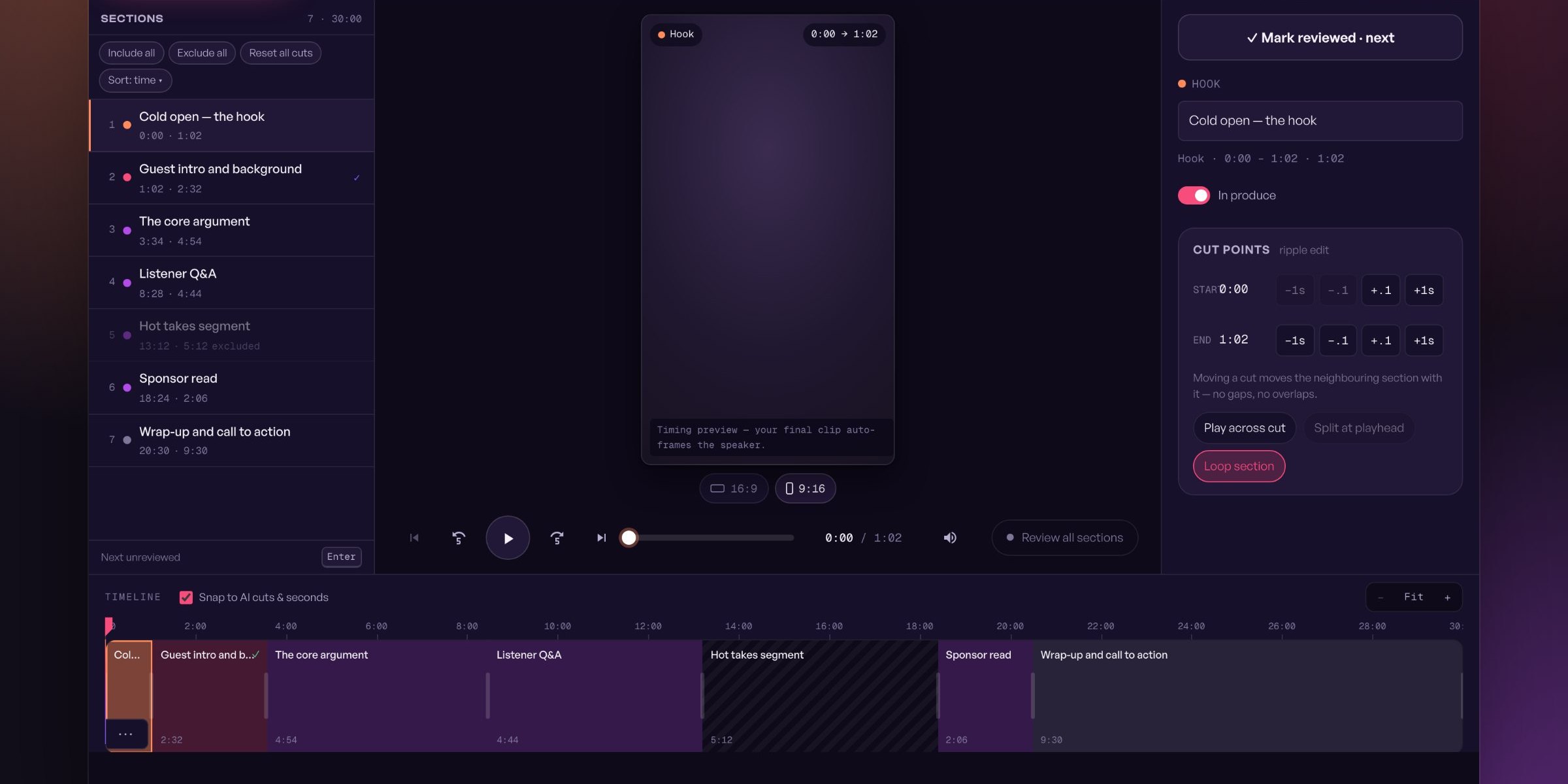
Sections
7 · 30:00Hook0:00 → 1:02
0:00
✓ Mark reviewed · next
0:00Cold open — the hook
MON
1:02Guest intro and background
TUE
3:34The core argument
WED
8:28Listener Q&A
THU
13:12Hot takes segment
FRI
18:24Sponsor read
SAT
20:30Wrap-up and call to action
SUN
Start where you already start.The hero you have today, with a headline that names the category instead of picking a fight with a competitor.
Start with the episode you already published.
Free — 1 hour of video a month. No credit card, no credits, ever. Every section becomes a clip; you choose which ones ship.